WebRTC5 min read
A Current WebRTC Pattern for the OpenAI Realtime API
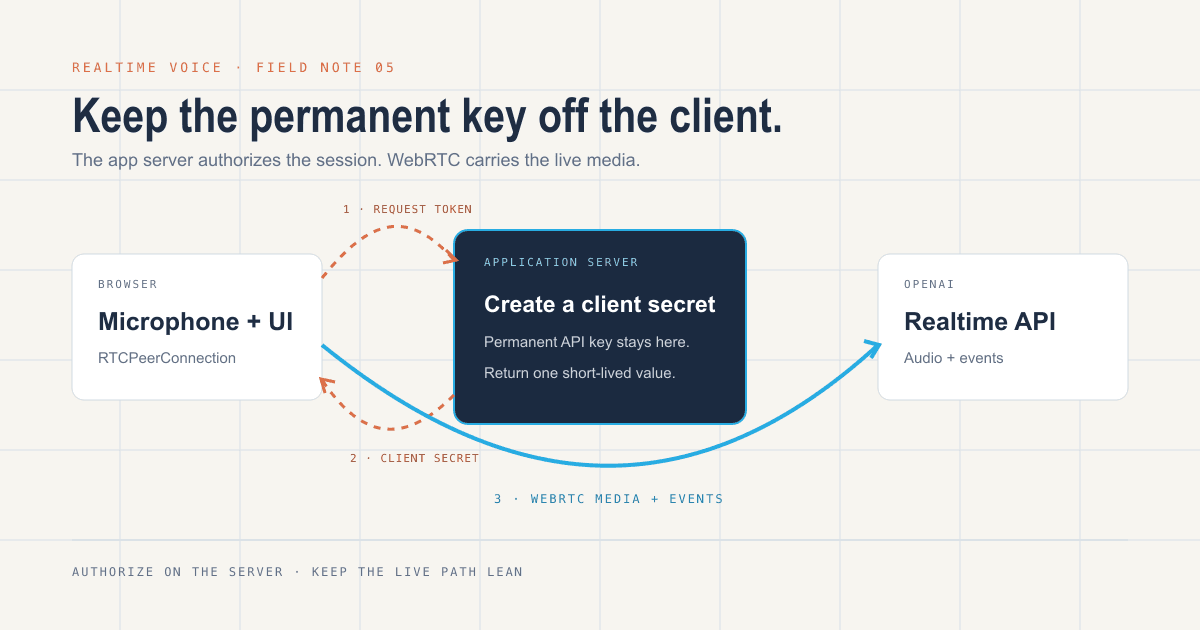
A browser can connect to OpenAI's Realtime API without exposing your permanent API key. The app server authorizes a short-lived session; WebRTC carries the live audio and events.
Updated July 2026 for OpenAI's current Realtime API. Realtime endpoints and event shapes change; verify the implementation against the official WebRTC guide before shipping.
The security rule is simple: your permanent OpenAI API key does not belong in browser code.
For a browser-based voice application, your server can create a short-lived client secret. The browser uses that value to open a WebRTC session with OpenAI. Your application server authorizes the session, but it does not have to proxy the live audio.
That split keeps the permanent credential on infrastructure you control and keeps the latency-sensitive media path lean.
The current flow
- The browser asks your application server for a Realtime client secret.
- The server calls
POST /v1/realtime/client_secretswith the permanent API key and the session configuration. - The server returns only the short-lived client secret to the browser.
- The browser creates an
RTCPeerConnection, adds the microphone track, and creates a data channel for Realtime events. - The browser posts its SDP offer to
POST /v1/realtime/callsusing the client secret. - OpenAI returns an SDP answer, and the WebRTC session begins.
This is a client-to-server WebRTC connection. It is not a peer-to-peer call between two browsers.
Server: create a short-lived client secret
The server owns the permanent credential and the default session policy. Keep the endpoint authenticated and rate-limited in a real application.
import express from 'express'

const app = express()

app.get('/api/realtime/token', async (req, res) => {
  try {
    const response = await fetch(
      'https://api.openai.com/v1/realtime/client_secrets',
      {
        method: 'POST',
        headers: {
          Authorization: `Bearer ${process.env.OPENAI_API_KEY}`,
          'Content-Type': 'application/json',
          // Use a stable, privacy-preserving identifier generated on your server.
          'OpenAI-Safety-Identifier': req.user.hashedSafetyId,
        },
        body: JSON.stringify({
          session: {
            type: 'realtime',
            model: 'gpt-realtime-2.1',
            audio: {
              output: { voice: 'marin' },
            },
          },
        }),
      },
    )

    if (!response.ok) {
      const detail = await response.text()
      console.error('Realtime token request failed', response.status, detail)
      return res.status(502).json({ error: 'Could not start voice session' })
    }

    res.json(await response.json())
  } catch (error) {
    console.error('Realtime token request failed', error)
    res.status(500).json({ error: 'Could not start voice session' })
  }
})The browser needs the returned value. It does not need—and should never receive—OPENAI_API_KEY.
Browser: open the WebRTC session
export async function connectRealtimeVoice() {
  const tokenResponse = await fetch('/api/realtime/token', {
    credentials: 'include',
  })

  if (!tokenResponse.ok) {
    throw new Error('Could not authorize a Realtime session')
  }

  const { value: clientSecret } = await tokenResponse.json()
  const pc = new RTCPeerConnection()

  const remoteAudio = document.createElement('audio')
  remoteAudio.autoplay = true
  pc.ontrack = (event) => {
    remoteAudio.srcObject = event.streams[0]
  }

  const microphone = await navigator.mediaDevices.getUserMedia({ audio: true })
  pc.addTrack(microphone.getAudioTracks()[0], microphone)

  const events = pc.createDataChannel('oai-events')
  events.addEventListener('message', (event) => {
    const realtimeEvent = JSON.parse(event.data)
    console.log(realtimeEvent)
  })

  const offer = await pc.createOffer()
  await pc.setLocalDescription(offer)

  const sdpResponse = await fetch(
    'https://api.openai.com/v1/realtime/calls',
    {
      method: 'POST',
      headers: {
        Authorization: `Bearer ${clientSecret}`,
        'Content-Type': 'application/sdp',
      },
      body: offer.sdp,
    },
  )

  if (!sdpResponse.ok) {
    microphone.getTracks().forEach((track) => track.stop())
    pc.close()
    throw new Error('Could not establish the Realtime connection')
  }

  await pc.setRemoteDescription({
    type: 'answer',
    sdp: await sdpResponse.text(),
  })

  return {
    peerConnection: pc,
    events,
    disconnect() {
      microphone.getTracks().forEach((track) => track.stop())
      events.close()
      pc.close()
      remoteAudio.srcObject = null
    },
  }
}This is the smallest useful shape. Production code still needs state, cleanup, error reporting, and reconnection behavior.
What I would add before shipping
Authenticate the token endpoint
A short-lived secret is safer than a permanent key, but an open minting endpoint can still be abused. Require an application session, rate-limit requests, and set a privacy-preserving safety identifier on the server-side request.
Make connection state visible
Listen to connectionstatechange and show the user whether the session is connecting, live, interrupted, or closed. Voice interfaces feel broken quickly when the state is hidden.
Stop every media track
Closing the peer connection is not enough. Stop the microphone tracks when the session ends, the component unmounts, or setup fails.
Treat the data channel as untrusted input
Parse events defensively. Validate the event type and the fields your UI uses. Do not assume every event has the shape you expected from an older model or API version.
Plan for interruption
A laptop sleeps. Wi-Fi changes. Mobile browsers suspend tabs. Reconnect with a new client secret rather than trying to preserve an expired session forever.
Put tool calls behind policy
If the voice agent can look up records or take actions, define the permissions and approval boundaries separately from the media connection. Low latency does not make an action safe.
When to use the higher-level SDK
OpenAI's current documentation recommends starting with its Voice Agents tooling for many browser speech-to-speech applications. The lower-level WebRTC interface makes sense when you need direct control over the peer connection, event channel, session lifecycle, or UI.
Choose the lowest level you actually need. Owning more protocol code is not automatically better architecture.
The part worth remembering
WebRTC solves the live transport. The client secret solves the browser credential boundary. Neither one replaces the product work around permissions, failure handling, user feedback, and safe tool access.
That surrounding system is what turns a voice demo into something people can rely on.
Related
- AI Agents Need Context, Not Hype — why permissions, context, and logs matter more than the model alone.
- AI Workflow Automation — how HiTek puts AI inside governed workflows.
- How we work — the operating approach behind production systems.